
WES Portal - WES

WES Portal
Enables collaboration, knowledge sharing, and private social networking within a secure, authenticated environment.
Collaborate and Communicate
For Better Decision Making
A web portal environment integrated with open-source portal environments (e.g., WordPress, Drupal, Liferay etc.) that enables collaboration, knowledge sharing and private social networking within a secure, authenticated environment.
Users have the option of also integrating WES into their existing website environments be it custom developed or implemented using the customers preferred platform.
Supports deployment and incorporation of an National Spatial Data Infrastructure (NSDI) portal. It provides an ecosystem for managing and sharing national geospatial information, including the technologies, standards, metadata, services, governance and organizations involved.
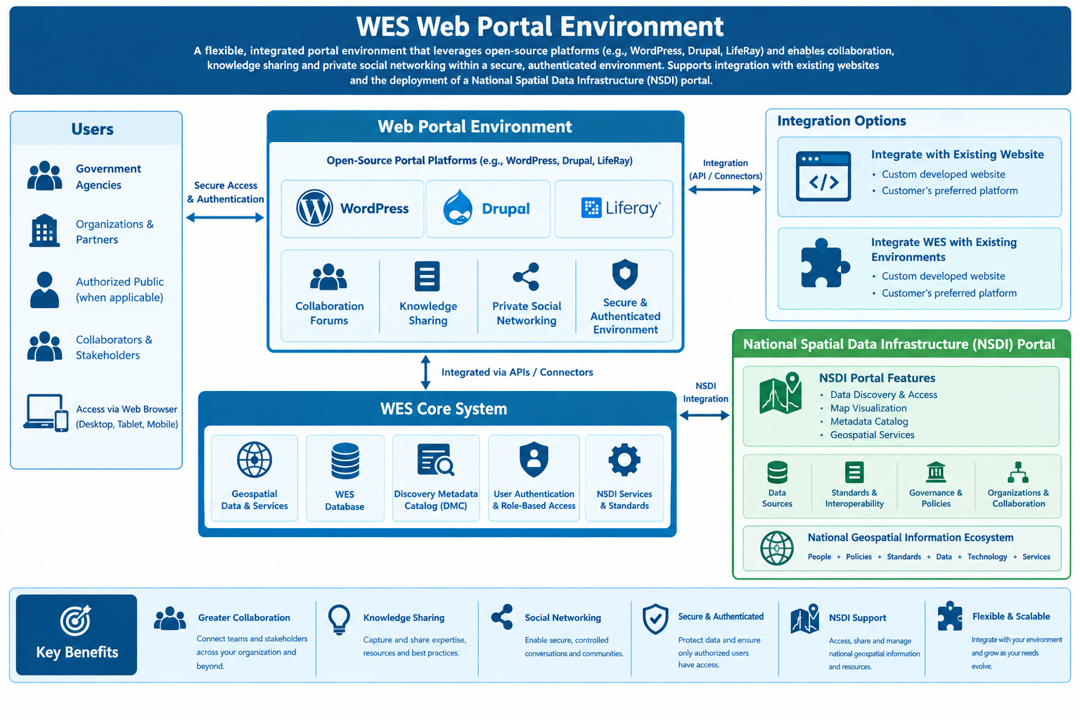
Often customers require a portal environment to facilitate providing information to their users that go beyond managing more than just the geospatial management. This component contains the interfaces that enable WES to be connected to an overall website management system.
WordPress
Drupal
Office 365/SharePoint/Azure
Liferay
Create Discussions
For Scenarios Based Events
Discussions – Discussion boards can be associated to portfolios to support real-time discussions regarding aspects of a scenario in a secure manner.
Track and Assign Tasks
For Mission, Incident or Events
Tasks and Logistics Requests - Provides users with the ability to assign tasks/logistics requests and track the status of these being assigned during the mission/incident/event management. At any one time, a manager can review all tasks/logistics requests and status within the system.
Publish Knowledge
For Decision Support using Wiki
Wiki Boards – Wikis can be quickly configured to be used to support briefings and situational awareness views.
WES Collaboration tools are components of WES Portal and are linked to WES Portfolios so that users can conduct discussions or assign tasks that are directly related to some situation or event. For example, a portfolio that has information and content regarding marine weather may have a discussion associated with current ice conditions and how they may affect offshore drilling operations. The screen capture to the left illustrates the portlets/apps that are provided in support of WES Portal.
WES Portal can also provide linkages to other portals such as Portal for ArcGIS.
Activities Portlet
Track User Activities
The activities portlet provides a summary of recent activities that have occurred regarding updates to portfolios and collaborations.
There are two actions:
Expand on notifications to obtain additional information.
Subscribe to be notified on actions you are interested in.
Calendar Portlet
Schedule Meetings/Events
The Calendar portlet is provided using out-of-the box functionality that has been integrated into the WES infrastructure. Functions are the same as similar calendars like Microsoft Exchange or Google Calendar. The calendar allows users and organizations to create, track, share, and manage events. User, can create as many calendars as needed. Administrators are able to manage the scheduling of resources.
Discussion Portlet
Create a Forum for Discussions
A discussion board (known also by various other names such as discussion group, discussion forum, message board, and online forum) is a general term for any online "bulletin board" where users can leave messages and receive message responses from other users. When a discussion is created, it is actually creating or participating in a thread. These threads are then associated to a Portfolio where the discussion is directly related to the mission, event or incident of interest. The Discussion portlet offers many configuration options that are straightforward to use.
Wiki Portlet
Build Your Own Wiki Information
The Wiki portlet is a full-featured, state-of-the-art wiki application that allows users to collaboratively build a repository of information. There are, of course, many implementations of this idea, the most famous of which is Wikipedia. A wiki application allows users to create and edit documents and link them to each other. To accomplish this, a special form of mark-up is used which is sometimes called wikitext. This Wiki portlet supports WikiCreole as its syntax. This syntax is a best-of-breed wiki syntax and should be familiar to users of other wikis. For every wiki there is a default page, called FrontPage, created and added to your wiki.
Chat Portlet
Instant Messaging at Your Fingertips
The Chat portlet provides a convenient way of allowing users to send each other instant messages when they are logged into the system. It appears as a bar at the bottom of every page, showing who is logged on, their statuses, and any chats the logged-in user has open. The Chat portlet is very simple to use. You can choose whether or not to show that you are online, and whether or not to play a sound if someone sends you a message while you have the window or tab in the background. The Chat portlet displays the number of users who are online.
Task Portlet
Track and Assign User Tasks
The Tasks portlet provides a convenient way of assigning tasks to be conducted in support of a mission, event or incident, as provided below.
Actions are associated with any given task.
Each task has a unique identifier and description.
An option is provided to assign a classification, if necessary, to a task.
A start and finish may be assigned to track the timeline associated with conducting a task.
Assignees can assign a percentage complete regarding the status of the task.
Each task has a status associated with it.
Each task has a priority.
One or more resources can be assigned to a task to assist with execution and completion.
Request a Live Demo
Access our demo site to use a sandbox version of WES.


